Development paused indefinitely. Ozma Labs is currently focused on scientific research and development. Work on the Ozma KVMA platform is on hold and may resume in the future. The existing open-source code remains available on GitHub. The page below describes the product as it was designed. See what the lab is working on now at ozmalabs.com.
Open source · AGPL-3.0 · Development paused

One controller.
Every machine at your desk.

Ozma is an open-source KVMA router — Keyboard, Video, Mouse, and Audio routed over a network. Plug a node into each machine. Switch between them in software, instantly, without moving a cable. The same routing fabric that makes switching work also powers AI agent control, compliance, cameras, backup, and identity — all on your hardware.

No spam. Launch updates and early-bird pricing only.

AGPL-3.0 open source WireGuard encrypted No telemetry by default Air-gapped deployment supported Read every line on GitHub

Switching without moving anything

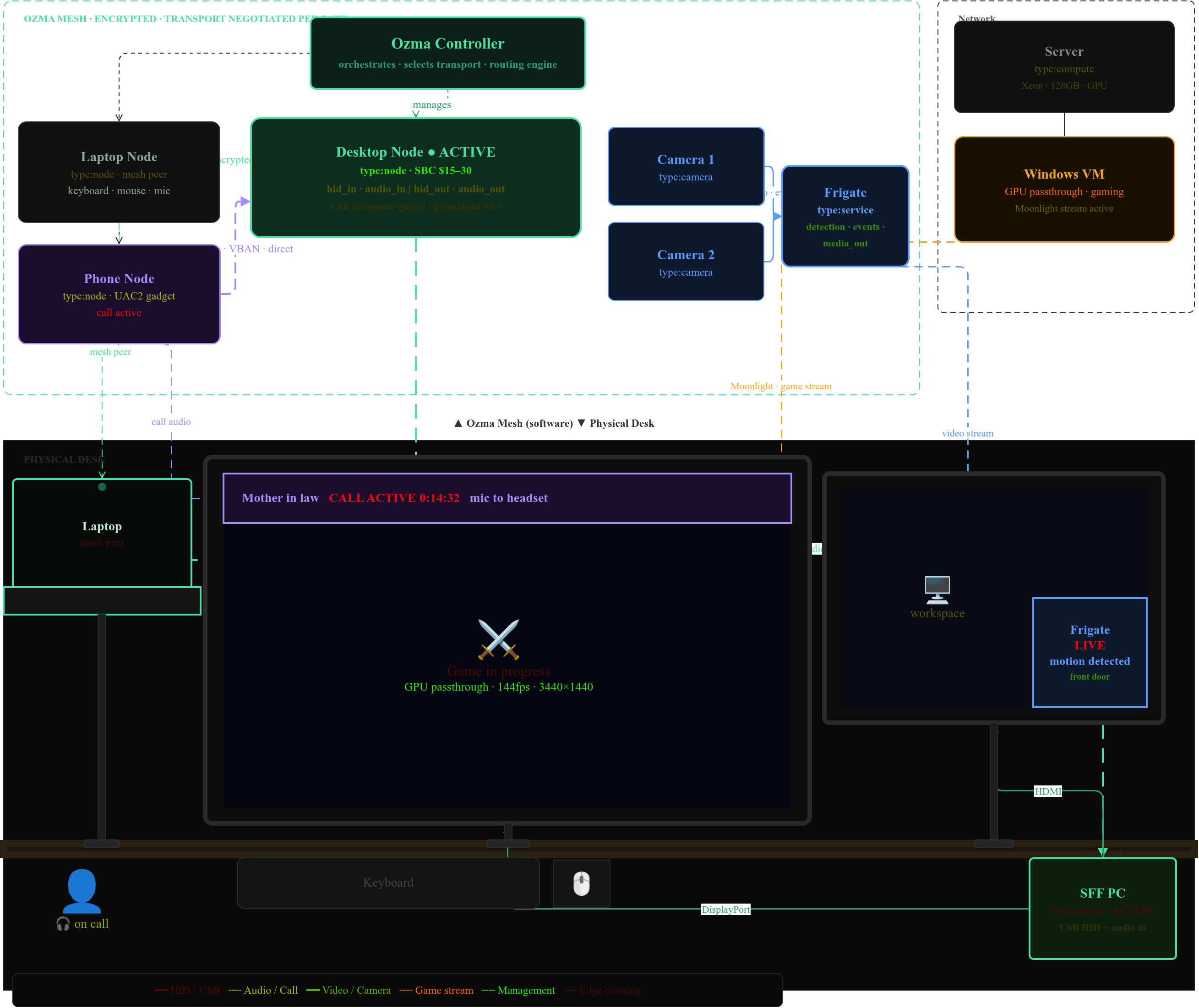
Every device joins an encrypted Ozma mesh. Data flows directly between peers — HID from your laptop to the active node, call audio from your phone straight to your desktop speakers. The Ozma controller orchestrates who's active and which transport to use. Nothing moves.

Ozma desk scene: routing graph showing laptop node, desktop node (ACTIVE), phone node, cameras, and Frigate service connected via encrypted Ozma mesh — with physical desk below showing ultrawide and 27-inch monitors on arms, laptop on arm, SFF PC, game stream, call overlay, Frigate PIP, and edge-crossing mouse warp from ultrawide to laptop

Start with a KVM switch.
End with an IT department.

Easy things automatic. Hard things easy. Amazing things possible.

KVMA Switching

Keyboard, Video, Mouse, and Audio routed in software. The world's first KVMA router — audio is first-class, not an afterthought. Any machine with a USB port joins the fabric without drivers or agents.

  • Fast switching via hotkey, scenario, or intent binding — typically under 50ms from keypress to the new machine receiving input. No display resync, no HDCP overhead
  • Video: HDMI capture (V4L2), Moonlight/Sunshine game streaming, soft-node D-Bus display, VNC, RTP H.265
  • Switch automatically based on context — time of day, active meeting, connected USB device, or any custom condition you define
  • Works at BIOS, on any OS, and on consoles — the target machine sees a standard USB device and never knows Ozma is there
Core · Open source

AI Agent Control

An AI agent can see your screens and control your machines. Built-in MCP server on port 7381 — works with any AI provider that supports the Model Context Protocol.

  • Visual grounding — the agent sees and clicks UI elements by what they are, not pixel coordinates. Works even when layouts change
  • Visual regression test runner: YAML test suites, screenshot diffs, CI/CD integration
  • Action approval modes: automatic / notify / require approval — per action type, per machine class
  • Hash-chained audit trail of every agent action
Connect · AI tier

Audio Routing

PipeWire-native. Cross-machine via VBAN. Room correction built in — sweep your room, apply corrections, done.

  • Any source to any sink across any machine on the mesh, persisted across reboots
  • AirPlay, Spotify Connect, Snapcast, RTP, and ROC as output targets
  • Room correction: play a test tone, record the response, apply a parametric EQ correction automatically. Use your phone as the mic — we compensate for its frequency curve
  • Control surfaces: MIDI (X-Touch), Stream Deck, OSC (TouchOSC), gamepad, generic foot pedal
Core · Open source

Security Cameras & NVR

Frigate NVR integration with on-device AI detection. A Ring replacement that doesn't send your footage to anyone else's server.

  • Camera nodes are KVMA nodes — same management plane, same mesh, same WireGuard certificate authority
  • AI person, vehicle, and animal detection via Hailo-8L, Intel/NVIDIA NPU, or CPU — fully local, no cloud
  • Doorbell: motion alert → overlay on your desk display → two-way audio via your headset
  • Mobile push notifications, guest access tokens, clip browsing
  • DIY NVR: OPi5 + 4-port PoE switch + Frigate ≈ $115 in hardware
Be the first to use this

Privacy & Security

Ozma captures keyboard input, video, and audio. The privacy architecture is deliberate, not an afterthought.

  • All traffic is WireGuard-encrypted — between controller, nodes, and agents
  • Zero telemetry by default. No data leaves your network unless you explicitly configure it to
  • Air-gapped deployment fully supported — Ozma Connect is optional for remote access, not required for operation
  • Zero-knowledge encrypted storage: your master key, never held by us
  • AGPL-3.0 — read every line of the code that handles your keyboard and camera
Core · Open source

Compliance & Audit

Six of eight Essential Eight controls satisfied at zero extra configuration. Statement of Applicability generated on demand.

  • ACSC Essential Eight ML3 (Australia) / CIS Controls (US) / Cyber Essentials (UK): patch management, application control, MFA, backups, admin privilege restriction, and audit logging are all automatic side-effects of deploying the agent
  • ISO 27001:2022 Annex A — 82% of controls evidenced automatically from data already collected
  • SOC 2, HIPAA, PCI-DSS, SOX: hash-chained tamper-evident audit log in append-only mode with S3 Object Lock
  • SBOM, CVE pipeline, and live vulnerability posture per machine — updated against CISA KEV daily
Business Pro

Backup

Restic engine. All five platforms. Zero-knowledge encryption using your controller master key — your data, your key, we hold neither.

  • Linux, macOS, Windows (with VSS open-file snapshots), FreeBSD (ZFS-native), OpenBSD
  • Smart mode: app-inventory-aware exclusions — reinstallable packages skipped with confidence, not just pattern-matched
  • Adaptive scheduling: idle, plugged in, and 24+ hours since last backup → runs automatically, no cron to configure
  • Business: Essential Eight ML3 compliant — append-only mode, S3 Object Lock, fixed GFS retention, auditor-ready evidence
Personal · Business included

Identity & Access

Built-in OIDC provider for personal use. Authentik for business. Single sign-on for every service on your LAN — Jellyfin, Immich, Gitea, Grafana, anything that speaks OIDC or SAML.

  • Social login (Google, GitHub, Apple) + password + passkey out of the box
  • Entra ID, Okta, Google Workspace, JumpCloud federation for business deployments
  • Vaultwarden managed password manager: Bitwarden-compatible, your data, your hardware, worldwide access via Connect relay. No cloud dependency
  • Multi-user: per-node ownership, seat sharing, fine-grained permissions
Business included

IoT Network Management

Ozma can be your router. Default-deny VLAN for every IoT device. Auto-onboarding. Works alongside UniFi, MikroTik, OpenWrt, and pfSense — or replaces them entirely.

  • Built-in 2.4 GHz AP: IoT SSID (WPA2, default-deny forward) + timed onboarding SSID (open, toggled per session)
  • Cameras discovered and configured in under 30 seconds from plug-in via ONVIF WS-Discovery
  • Per-device cloud allow rules, nftables rule generation, DHCP lease sync
  • DNS filtering: 6 built-in blocklists, SafeSearch enforcement, per-category control — ad-blocking included
Be the first to use this

Screen Rendering & Displays

Any screen becomes a managed Ozma display — from a 32×8 LED matrix to a 4K monitor showing live hardware stats.

  • 14 drivers: Stream Deck, Corsair LCD, NZXT Kraken, OLED, e-ink, LED matrix, and more
  • Three rendering tiers: Node.js server-side frames, native ESP32 render at 60fps, constrained pixel devices
  • Hardware monitoring panels with CPU, GPU, temps, and network — rendered by Ozma directly from live controller data
  • HDMI capture: V4L2 → ffmpeg → HLS/MJPEG, with hardware encoder auto-detection (NVENC / VAAPI / QSV)
Core · Open source

Remote Desktop & Browser KVM

Full keyboard and mouse control of any machine in your mesh, from any browser. No client software, no VPN to configure separately — it's built into the controller.

  • WebSocket HID: low-latency keyboard and mouse forwarded to the target machine exactly as if you were sitting there
  • Privacy mode: blank the physical display via DDC/CI during a session — no shoulder-surfing while you work remotely
  • Consent flow for workstations: the local user can approve or deny incoming remote connections
  • Every session logged in the hash-chained audit trail — who connected, when, for how long, and what they did
Connect included

Enterprise IT for everyone

Building proper IT used to require specialists for identity, security, compliance, infrastructure, and helpdesk — each with a salary and a tool budget. That maths has changed.

$560k+
Annual cost of a proper IT team and toolset for 50 people
IT director + security engineer + sysadmin + tooling (identity, EDR, backup, compliance scanner, password manager)
$30/user
Per month with Ozma Business Pro, on hardware you already own
Scales linearly. No per-feature add-ons. No surprise overages.
1 agent
One deployment covers KVMA, compliance, backup, security, and AI
One data model. One audit trail. Every capability is a query against data already collected.

The reason this is possible: the data Ozma collects to run a KVMA router — which machines exist, what's running on them, who's using them, what's connected — is exactly the data needed for asset inventory, endpoint compliance, network security, and audit logging. Every IT management capability is a view on data already collected for switching.

Ozma also makes Linux a viable daily driver for non-technical businesses. Built-in identity management, AI helpdesk, agent-managed machines, and a Windows VM as an escape hatch remove every remaining blocker — without touching user hardware or paying a Microsoft licence tax.

For the right businesses, Ozma effectively replaces an IT director, a sysadmin, an EDR tool, a backup vendor, a compliance scanner, and a password manager — with a single platform that costs less than one of those line items. The economics only work because one agent does the job of many separate tools.

The software stack

Four components. All open source under AGPL-3.0. Audit, extend, and self-host everything. The controller runs on any x86 Linux machine — a $150 N100 mini-PC is the reference platform. No subscription required for local operation.

Controller
Python · FastAPI · asyncio
The brain. Routing graph, intent system, HID forwarding, mDNS discovery, web UI, REST + WebSocket API, and every subsystem listed on this page. Runs on any x86 or Arm Linux box. Docker image available.
Routing graph Intent bindings MCP server Compliance IoT mgmt Cameras
Hardware Node
Python · C · Linux configfs
Runs on RISC-V, Arm, or x86 SBCs. Registers via mDNS. Presents as a USB composite device: keyboard + mouse + audio + camera. HLS video stream. GPIO for power and reset control. $15–30 in parts.
USB HID gadget V4L2 capture VBAN audio Power/reset RGB LEDs
Soft Node
Python · asyncio · libvirt
Runs on the VM host. Auto-discovers all VMs via libvirt. Uses QMP for HID injection, D-Bus display for framebuffer, and evdev uinput for input. No guest-side changes needed. Proxmox plugin included.
QEMU/KVM Proxmox plugin D-Bus display Looking Glass Virtual USB
Desktop Agent
Python · cross-platform
Optional. Runs inside the machine's OS. Unlocks AI control, screen capture, backup, system metrics, UI element detection, and remote desktop. Fully cross-platform: Linux, macOS, and Windows.
AI control Backup Screen capture System tray OCR

Your controller, anywhere

Managed relay, encrypted backup, and remote access. Flat pricing — we don't meter traffic or feature-gate by usage. The controller software is free forever; Connect is optional infrastructure on top of it.

Personal
Free
  • Remote KVM access from anywhere — great starting point for a home setup
  • Encrypted config backup
  • Controller subdomain (*.c.ozma.dev)
  • HTTPS + WireGuard relay
  • Export-only key backup
Personal+
$5 / month
  • Everything in Personal
  • Password / passkey key backup in Connect
  • Zero-knowledge camera recording
  • AI agent access — connect your own API key from any supported AI provider
  • Regional relay priority
Business Pro
$30 / user / month
  • Everything in Personal+
  • Authentik identity + directory integration
  • Compliance evidence packages (Essential Eight, ISO 27001, SOC 2)
  • Business backup (Object Lock, append-only, auditor-ready)
  • YubiKey + bring-your-own-key encryption
  • Priority support
"I had a gaming PC, a work laptop, a server, and a NAS — all fighting over the same keyboard, monitors, and headset.
I built a software-defined version of what should have existed.
Then I kept going."

The starting point was a personal problem. Four machines. One desk. A USB KVM switch that introduced display resync lag, dropped audio, and cost $200 for four ports. I knew the routing could be done in software. I wrote a controller daemon, built a node out of a spare SBC, and wired it up. It worked.

Then I added audio routing, because audio is half the experience and hardware KVM switches treat it as optional. Then cameras, because I already had the network fabric and Frigate needed a management layer. Then backup, because the agent was already on every machine. Then compliance, because the data was already flowing. At some point it stopped being a KVM switch and started being something more interesting.

The professional context that makes this possible: I have spent twenty-five years being the person other businesses call when they can't work out why their network is down, why their compliance audit failed, or why their backups haven't run in six months. I have designed identity systems, built monitoring stacks, wired up camera networks, and written the security policies — each time, from scratch, for a fraction of what it should cost.

The insight that connects both halves: the data Ozma collects to run a KVMA router is exactly the data you need to run an IT department. Which machines exist, what's installed on them, who's logged in, what's on the network. Every capability is already there — it just needed something to surface it. That's the gap Ozma fills.
Get early access to Ozma Connect

Sign up for early-bird pricing and launch updates. The controller is open source and available now — Connect is what's launching.

No spam. Launch updates and early-bird pricing only. Unsubscribe anytime.